Establishing a Connection and Fallback Strategy
S36 determines which fallback action occurs
if the protocols and procedures set by S46 and
S48 do not produce a LAP-based (LAPB) error-controlled
connection.
The optimum fallback control strategy depends on which Hayes error-control
modem you have. The fallback behavior is determined by Sregisters S36, S46,
S48, and command &Q5.
Note: Three flow charts in this section depict the fallback control
process for Hayes Vseries modem types.
There have been two improvements in the Vseries that affect S36: The first
added &Q6 Asynchronous Speed Buffering (ASB); ASB provides the same fixed
speed DTE interface and local flow control as in the error control mode
but without the error control or remote flow control. The second improvement
added V.42 with its Alternate Protocol (MNP).
S36 in the pre-ASB Vseries modems consisted of one bit, Bit 0, which permitted
the user to decide if the modem would hang up if it did not negotiate an
error-controlled connection. The factory default for S36 was 1, which meant
fall back to direct async rather than hang up if an error control protocol
is not established in &Q5 mode.
When &Q6 (ASB) was added, a fall back option for &Q5 mode, which can be
controlled with S36, was also added. If S36 Bit 1 is set, and bit 0 is also
set, the modem falls back to ASB instead of direct async if no error control
protocol is established in &Q5 mode. The factory default for S36 remained
1.
When V.42 was added, it added another fall back option, MNP, to S36. If
S36 Bit 2 is set, then MNP is attempted if the primary protocol selected
in S48 is not established. Bit 2 is evaluated before Bit 0, then Bit 1.
If MNP is established as the protocol, then Bits 0 and 1 are ignored. The
factory default became 5 and later was changed to 7 to take advantage of
ASB.
Since there are three possible values of S36, you need to determine which
error control technique the software is using. First, verify that it is
a Hayes error-control modem. This is done by issuing an I4 command and looking
for the existence of a b-string. A b-string begins with a lower case letter
b and is followed by several upper case letters or numbers forming a hex
value.
To identify whether a Vseries modem supports ASB, (also called Buffered
Async, or Normal), issue the following AT command, AT &Q6 &Q5 <CR>.
If the result code is OK then &Q6 is supported, and ASB is also supported
as a fall back. If the result code is ERROR, &Q6 is not supported. If this
is the case, then software should fall back to a direct async connection.
To identify whether a Vseries modem supports V.42 (and MNP), decode the
first character after the leading b in the b-string of the I4 ID command
response. The characters following the b in that line are ASCII-hex (0-9,
A-F), which decode into 4 bits of ID code (3-0). If Bit 3 is set, then MNP
is supported; Bit 2 is V.42.
If S36 bits are supported, the software may now configure the modem and
anticipate the fall-back action.
You should be able to set S36 bit 2 to enable V.42 (and MNP) even if those
protocols are not supported in the modem.
If the modem does not support ASB, then software should read the CONNECT
XXXXX speed result code and change the DTE port speed to match the indicated
line speed of the direct connection when no error controlled connection
was negotiated.
If software does not change port speeds in response to the CONNECT message,
then when software identifies a pre-ASB Vseries modem, it should
set S36 to 0 or 4 so that no protocol is negotiated, and the modem hangs
up.
The following table shows the order in which the bits of S36 are evaluated:
Note: These steps only occur after the S46/S48 selections have failed
to make a LAP-B error controlled connection in &Q5 mode.
Order     Interpretation


S36       Bit 7-3=0 reserved


First     Bit 2 (4) If set, try MNP protocol; reset do not use MNP.


Third     Bit 1 (2) If set, fall back to ASB; reset means direct async.


Second    Bit 0 (1) If set, fall back based on Bit 1; reset hang up.
The following table defines each setting:
Setting     Meaning


S36=7       Try MNP, then fall back to ASB.


S36=6       Try MNP, then hang up.


S36=5       Try MNP, then fall back to direct async.


S36=4       Try MNP, then hang up.


S36=3       Do not try MNP, fall back to ASB.


S36=2       Do not try MNP, hang up.


S36=1       Do not try MNP, fall back to direct async.


S36=0       Do not try MNP, hang up.
The following flowcharts depict the fallback strategy of Hayes Vseries products.
To determine which chart applies to your Hayes Vseries product, refer to
the following chart:
         ATI3 Response contains...


         Vseries Smartmodem 2400           Vseries Smartmodem 9600


Type 1   04-00005-10                       04-00015-10


         04-00005-11                       04-00015-11


         04-00005-12                       04-00015-12


         04-00005-13                       04-00015-13


                                           04-00015-14


Type 2   04-00005-14                       04-00015-15


                                           04-00015-16


Type 3   Does not contain any of the above Does not contain any of the above numbers.
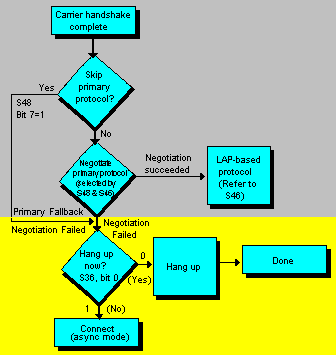
Type 1: Hayes Modem in &Q5 Communications Mode
Applies to Vseries Smartmodem 2400 up to and including Version 1.3 and
Vseries Smartmodem 9600 up to and including Version 1.4.
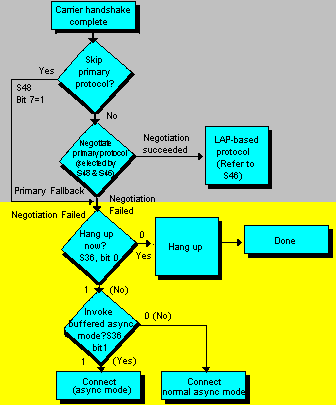
Type 2: Hayes Modem in &Q5 Communications Mode
Applies to Vseries Smartmodem 2400 Version 1.4 and Vseries Smartmodem
9600 Versions 1.5 and 1.6.
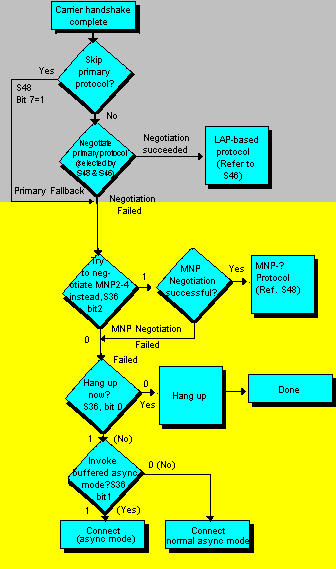
Type 3: Hayes Modem in &Q5 Communications Mode
Applies to all Vseries products newer than Types 1 and 2.
Click here to return to the Contents page.